The first forward-building dial-plan editor

See your dial plan.
Finally.

The first forward-building editor for the FreePBX family — drop the inbound, wire the next node, save, instead of building backward through dropdowns to make destinations exist before the routes that point at them. Trace any DID from inbound to voicemail in seconds, with live registration and queue-agent status on every node, simulate any time of day, and export a clean diagram for the handoff.

On VitalPBX, the same live visualizer covers every tenant on one canvas.

FreePBX family & VitalPBX Free 30-day trial, no card Self-hosted — your data never leaves
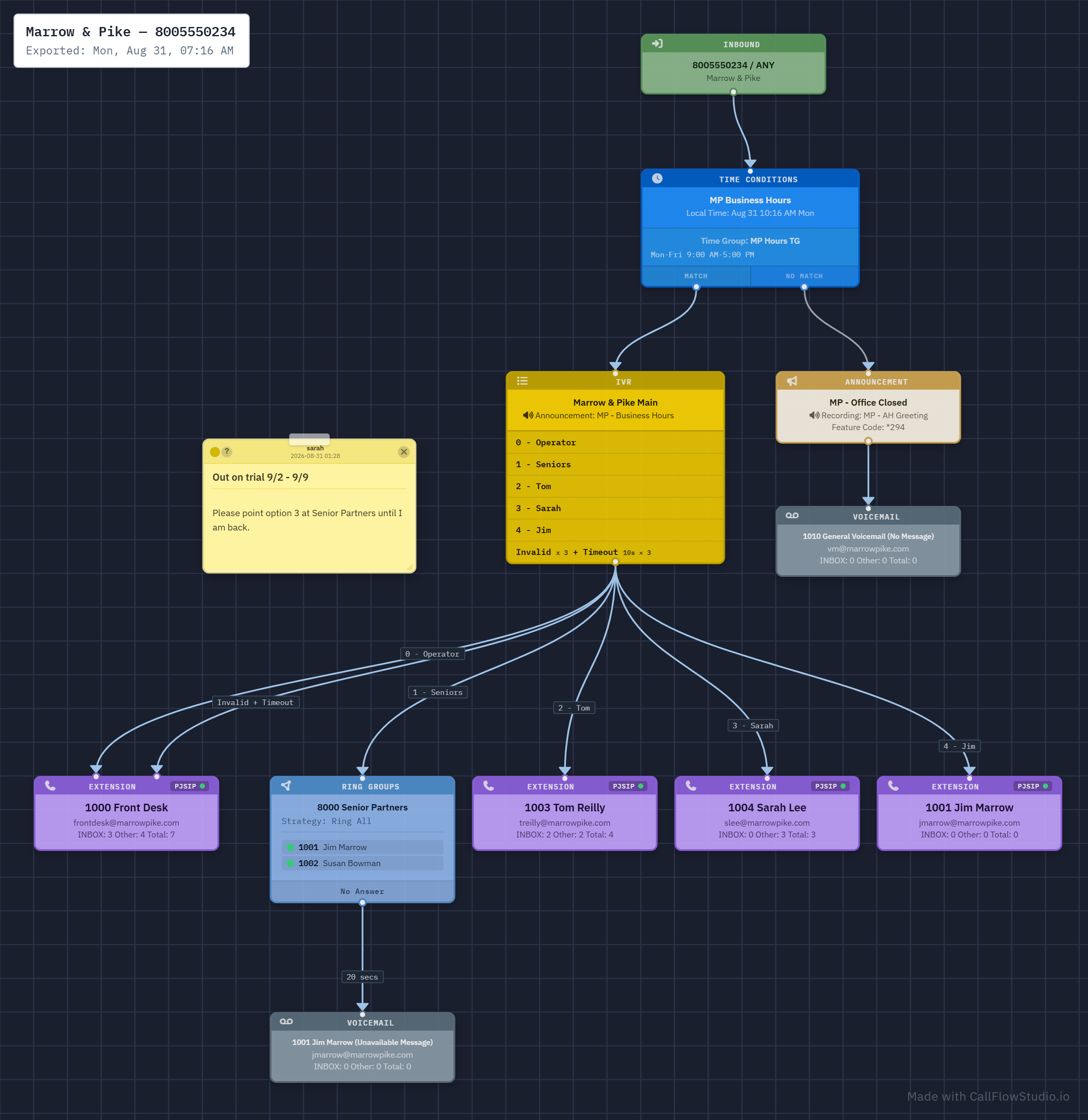
Call Flow Studio canvas mid-rewire — Senior Partners ring group with a pending change ready to save
FreePBX 14, 15, 16, 17 VitalPBX (multi-tenant) Live registration status In-Use-By reverse walk Self-hosted No usage telemetry Build dial plans forward Undo / redo edits FreePBX 14, 15, 16, 17 VitalPBX (multi-tenant) Live registration status In-Use-By reverse walk Self-hosted No usage telemetry Build dial plans forward Undo / redo edits
The problem

You build it backward, then live in 14 tabs to trace it.

WITHOUT_CFS · BUILDING

FreePBX's destination dropdowns only contain modules that already exist. So to wire a new flow you build it backward: queue first, then the IVR that points to the queue, then the time condition that points to the IVR, then the inbound route that points to the time condition.

Or you go top-down with placeholder destinations, then circle back through every node to fix them once the real downstream module exists. Miss one and a holiday call lands in terminate.

Either way, building a 12-node call flow takes an afternoon and three context switches.

And there's no undo. Every fix is a fresh manual edit through the same backward chain.

WITH_CFS · BUILDING

Drop the inbound. Drop the next node, wire it. Drop the next, wire it. CFS resolves destinations as you go and saves the whole flow in a single transaction.

The first forward-building dial-plan editor for any Asterisk-based PBX front-end. Build the way you actually think about a call: from "the call comes in" toward "this is what answers."

Change your mind? Ctrl-Z. Linear undo on destination edits, plus an Activity Log that shows every change anyone has made.

WITHOUT_CFS · TRACING

You click into Inbound Routes. Then Time Conditions. Then the IVR. Then another Time Condition. Then a Ring Group that points to a Queue. Each screen tells you one step.

To answer "where does the main number go at 6:47pm on a holiday?" you open five tabs, build the path in your head, and hope you didn't miss a CFC toggle.

New engineer joining the team? Schedule a week.

WITH_CFS · TRACING

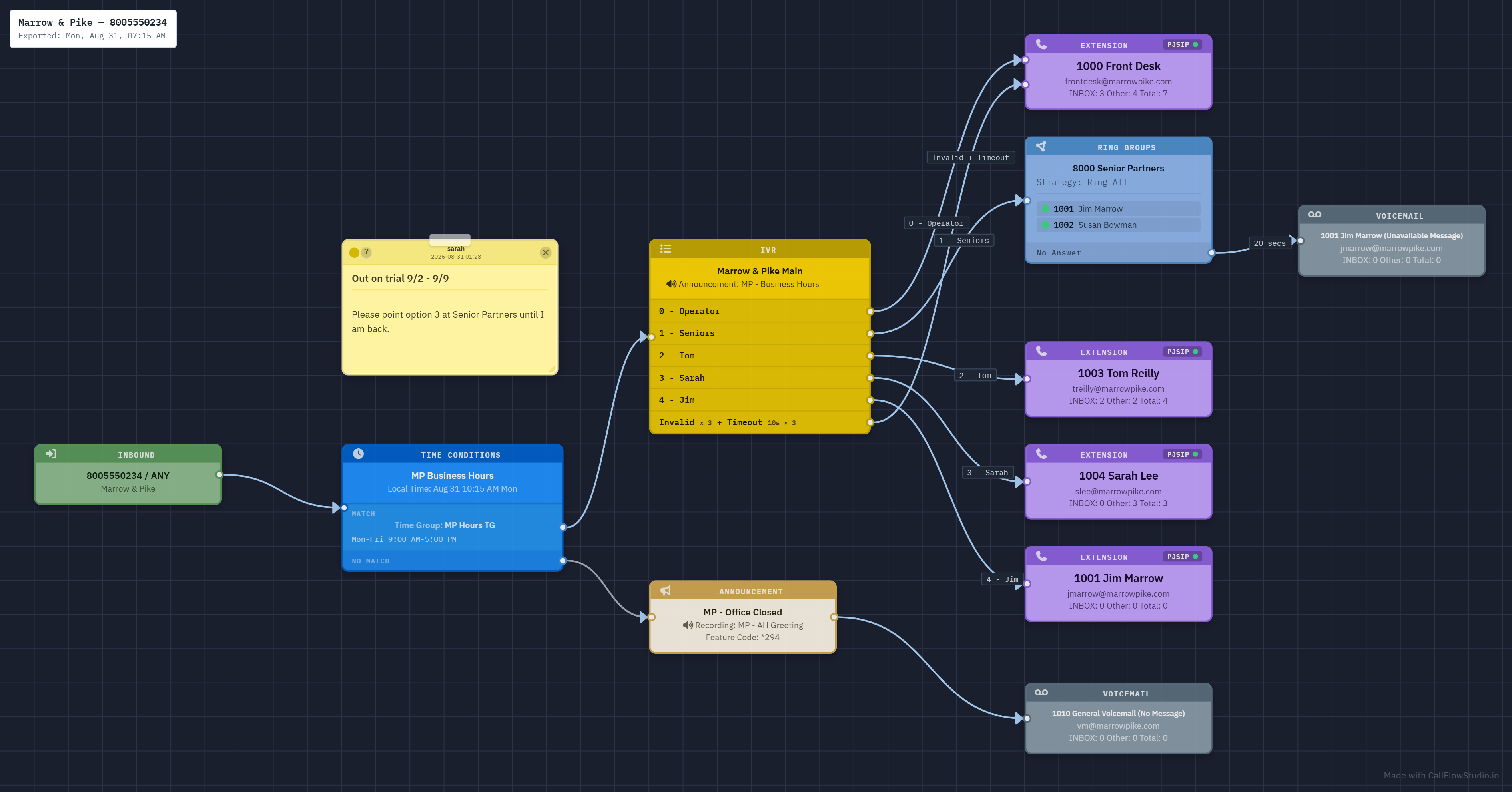
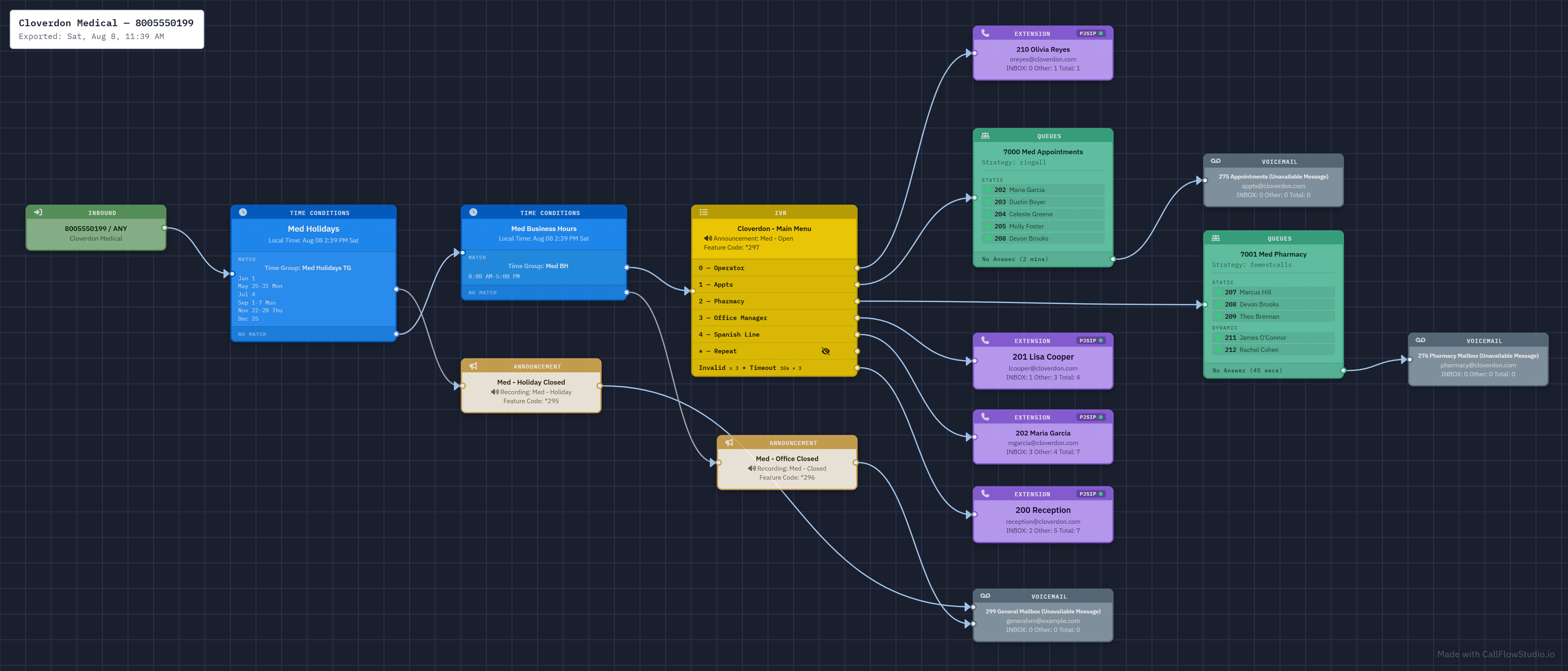
Pick a DID. The full graph renders in under a second — every route, every branch, every failover. Day/night overrides are visible. Holiday conditions are visible.

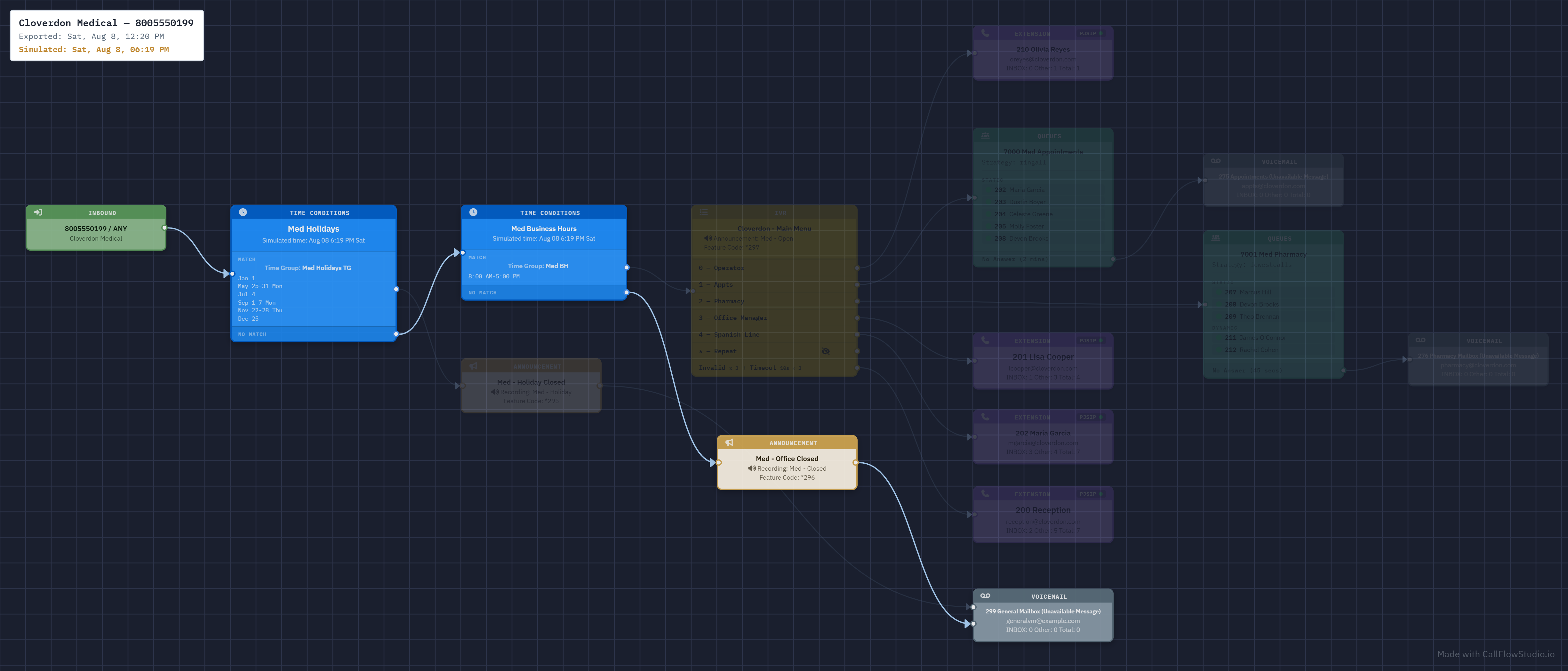
Simulate a time, the graph dims the paths that wouldn't fire. Click any node, edit it, save. Drag to rewire. Export as PNG for the customer handoff.

New engineer joining? Open the page.

What's in the box

Not a diagram tool. A dial plan IDE.

Every feature is built for one job: understanding and modifying production call routing without breaking it.

Build forward

Drop the inbound, drop the next node, wire it, save. The first forward-building dial-plan editor for the FreePBX family — no more starting at the queue and walking backward through dropdowns to make destinations exist before the routes that point at them.

Live status, on every node

Extension nodes paint a registration dot in real time — green for registered, red for offline, amber for DND, purple for call forward. Queue and ring-group rows show the same dots per member. Pulled live on every graph load, on both platforms.

Time travel

Simulate any date and time. The graph dims paths that wouldn't fire and highlights the one that would. "What happens during the company event next Tuesday afternoon?" — pick the time and the graph shows you, instead of tracing it by hand.

In-Use-By reverse walk

Pick any destination and CFS walks every module's destination columns backwards, rendering every node that points at it as a dashed reference card. Phantom references stop being phantoms.

Export for humans

PNG with a destination + timestamp stamp. Full quality, or sanitized — PII blacked out for diagrams that travel beyond the PBX owner. One button from canvas to attachment.

Undo — even after Apply Config

Undo isn't a feature in your PBX admin UI; it is in Call Flow Studio. Ctrl-Z reverts the last destination change, Ctrl-Y redoes, and the Activity Log tracks every edit with one-click revert — yes, even after an Apply Config.

See all 12 features →

See it work

Real dial plans. Real screenshots.

Three production-shaped call flows — a law firm, a medical practice in normal hours, the same practice after-hours. Sticky notes, multi-user attribution, time-of-day simulation, all visible at a glance.

pbx.bridgewaterlaw.com/cfstudio/?ext=8005550234
Sticky notes with multi-user attribution — every note shows who wrote it and when.

More screenshots →

Who it's for

Built for the people actually maintaining the PBX.

Telecom consultants

Stop re-discovering the dial plan every site visit.

Walk into a new customer's PBX, render their graph, get oriented in a minute. Export clean, branded diagrams for the handoff. Bill for understanding, not archaeology.

MSPs & resellers

Onboard a new tech in a day, not a month.

The graph is the documentation — new hires understand customer routing instantly. When a "why isn't my phone ringing?" call comes in, hand a read-only login to whoever's helping — a junior tech, a teammate, or a customer who can reach it — and walk the dial plan together on the phone while you fix it live. No PBX admin access changes hands.

In-house sysadmins

Finally hand off on-call without guilt.

Your backup admin doesn't need to learn every FreePBX tab — they just open the graph. Time conditions, holiday rules, CFC toggles: all visible. No tribal knowledge.

Pricing

Free to start. Pay only when you scale.

Install free and run the full product for 30 days on both platforms. After that, a generous free floor you keep for good — a complete read-only visualizer on the FreePBX family, your first two tenants on VitalPBX. One per-PBX license keeps the full experience.

$79 early access ($129 standard) · one-time · per PBX · or buy a license →

Questions

The ones we always get.

Which PBX platforms does CFS support?

FreePBX 14, 15, 16, 17 and FreePBX-based distributions — full editor (read + write), including commercial distros like PBXact and ClearlyIP and the community Incredible PBX. VitalPBX ships as a first-class read-only visualizer. The platform is auto-detected at install. Self-hosted only — CFS installs over SSH as root. Don't see your PBX? Email support@callflowstudio.io.

Is Call Flow Studio really free? What does a license cost?

Install free and run the full product for 30 days — full editing on the FreePBX family, unlimited tenants on VitalPBX, no credit card. After that it settles into a free floor you keep for good: the complete read-only visualizer on the FreePBX family, your first two tenants on VitalPBX. One Call Flow Studio license ($79 early access, $129 standard, one-time and per-PBX) keeps the full experience. No paywall, no locked-out screen — we never delete your data.

Does CFS send my call data anywhere?

No. It runs entirely on your server. No telemetry, no analytics, no outbound API calls once activated. License activation is the only optional online check, and it's a single HTTPS POST at install time — CFS works fully offline after that.

All questions →