Is there a tool to see a VitalPBX call flow? Yes. Call Flow Studio. VitalPBX has no built-in visual call-flow diagram, and the FreePBX dpviz module won’t install on it. Call Flow Studio reads your VitalPBX configuration directly and draws the routing (inbound routes, time conditions, IVRs, queues, ring groups, extensions) as an interactive graph, with live registration and queue-agent status on every node. It’s read-only on VitalPBX (see below for why).
Does VitalPBX have a native call-flow visualizer?
No. VitalPBX doesn’t ship a built-in graphical dial-plan or call-flow diagram. It’s a long-standing request on the VitalPBX community wish list. The built-in reports (Active Calls, PJSIP Endpoints, CDR) show you what is happening now and what already happened, but not the routing logic: how a call moves from an inbound route through a time condition, IVR, and queue.
FreePBX users reach for the open-source dpviz module for this. dpviz is FreePBX-only. It won’t install on VitalPBX, which uses a different config schema and admin framework. On VitalPBX, Call Flow Studio is the tool that fills that gap.
sngrep vs Call Flow Studio: which do you want?
Most people asking “how do I see a VitalPBX call flow” want one of two different things. Both are useful; they’re not the same tool.
| sngrep / Wireshark | Call Flow Studio | |
|---|---|---|
| Shows | Live SIP packets as a ladder (INVITE → 200 OK → BYE), RTP | The routing logic as a map: route → time condition → IVR → queue |
| Best for | Debugging a specific live call / signaling | Understanding & documenting how the dial plan is wired |
| Where it runs | On the server, per-call capture | In the browser, the whole routing graph |
| Live state | The packets of one call in flight | Registration & queue-agent status on every node |
sngrep is excellent at what it does: tracing one call’s signaling. If the question is “why does this DID end up there,” that’s the routing map, and that’s Call Flow Studio.
What Call Flow Studio shows on VitalPBX
- Inbound routes, time conditions, IVRs, queues, ring groups, and extensions as one interactive graph
- Live registration and queue-agent status on the nodes themselves
- Path highlighting and time-travel: simulate a date/time and see which branch a call takes
- PNG and SVG export with optional one-click sanitization for safe sharing
- Sticky notes and annotations on the canvas
Built for more than one tenant
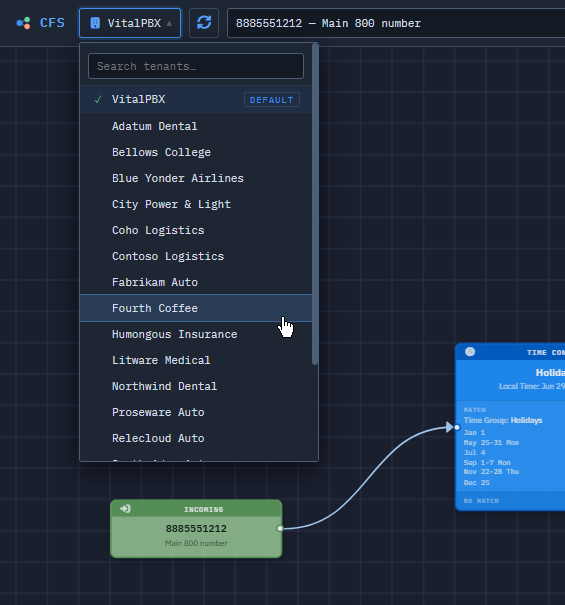
Every tenant gets its own canvas, and you switch between them in a click without leaving the graph. Search spans all of them: start typing in the tenant you’re in, widen the search to every tenant, and Call Flow Studio groups what it finds by customer and lands you on that flow in that tenant when you pick one. “Which customer owns this queue?” stops being a question you answer by opening tenants one at a time.
Access follows the same shape. Call Flow Studio runs its own login system, separate from VitalPBX admin auth, and each login is scoped to the tenants you assign it: a technician who handles three customers sees and searches three, not the whole box.
That holds as the box fills up. Add a tenant in VitalPBX and it’s on the canvas the next time Call Flow Studio loads. There’s no second license to buy for tenant number twelve. Call Flow Studio is licensed once per PBX, however many tenants end up on it. One thing to plan around: after the 30-day trial, an unlicensed install covers your first two tenants only, so a login scoped to tenant four has nothing to open until you activate.
Why is it read-only on VitalPBX?
On VitalPBX, Call Flow Studio is a first-class read-only visualizer: the same graph, the same live registration, the same time-travel and path highlighting, the same export, the same sticky notes you get on the FreePBX family. The two platforms simply handle configuration changes differently: Call Flow Studio’s editing is built on the FreePBX family’s own configuration tools, while on VitalPBX, making changes lives in the VitalPBX admin UI, where it has always lived. So on VitalPBX, Call Flow Studio focuses on what it does best: giving you the complete, live picture of your whole dial plan. If editing becomes possible on VitalPBX in the future, we’ll add it.
Will it install on my VitalPBX?
Yes. Call Flow Studio is self-hosted. It installs over SSH as root and auto-detects VitalPBX at install time (from /etc/vitalpbx/database.conf). It reads VitalPBX’s own configuration, not raw extensions.conf, so your existing call flows appear immediately on first load. Nothing to migrate; your routing data never leaves your server.
Get started
Call Flow Studio is ready to install today. Install free, and the first 30 days are unlimited tenants on VitalPBX. After that it settles into a free read-only visualizer for your first two tenants, yours for good, and an optional one-time license keeps unlimited tenants. Questions about running it on VitalPBX: support@callflowstudio.io.